
BlackVue
pittasoftMaps & Navigation
3.4953.00 Reviews
- Version
- 4.29
- Installs
- 1.00M
- Age Rating
- Everyone
Screenshots
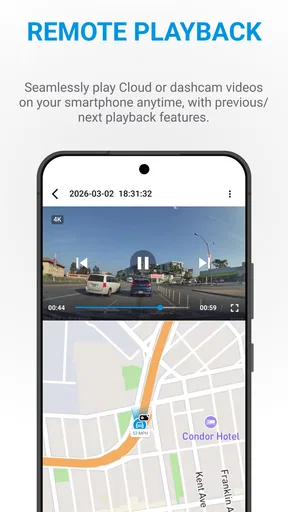
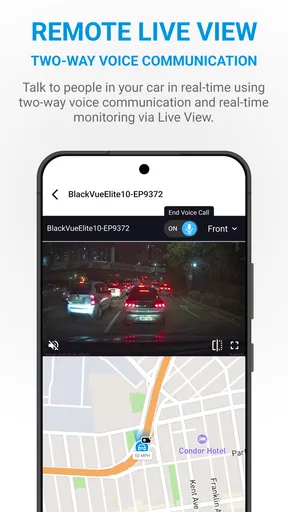
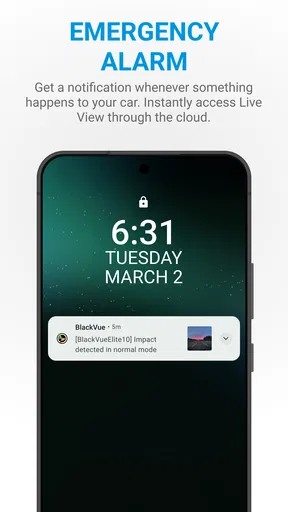
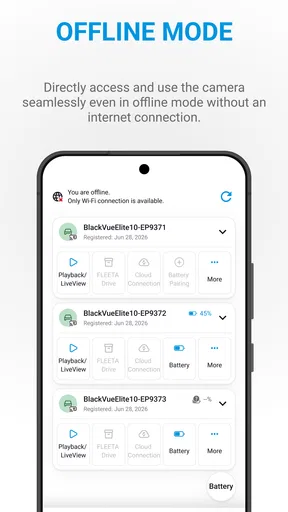
Our Review of BlackVue
 Analysis by Appyee
In a shared car, a dashcam app is useful only if the people who need the footage can actually get to it. I see BlackVue as a companion for owners of BlackVue dashcams, not a general-purpose navigation app: its value is in viewing and managing camera footage, with cloud access as part of the experience. That distinction matters in a household. If you expect turn-by-turn directions or a shared family map, this is the wrong tool; if several people use the same car and need a practical way to check recordings, it can fit.
When the car and camera are shared
Picture a weekday when one person drives the car to work and another takes it later for errands. If something unusual happens on either trip, the camera may have captured it, and the app gives the owner a way to view recordings rather than searching through files on a computer first. That can make a difference when the driver wants to review a moment while it is still fresh.
For a shared vehicle, I would agree on who handles the camera before anyone relies on it. One person can learn the connection and download process, then show other regular drivers where playback and file management are. This is a simple household routine, not a feature I would assume the app provides automatically: clear expectations help avoid the awkward question of who has access to a recording or who is responsible for saving it.
BlackVue is made by pittasoft and sits in the maps and navigation category, although its role is closer to dashcam control and footage review than to route planning. It is free to install, rated for Everyone, and has a 3.1 average from around 8.9 thousand ratings. Those figures suggest a mixed reception, so I would treat it as a useful tool to test with a compatible camera rather than assume every connection or workflow will feel effortless.
Set expectations before connecting
When it comes to dash cams, I’ve always been a bit of a tech enthusiast, so diving into the world of the BlackVue app was an absolute treat. This app acts as the perfect companion for your BlackVue dash cam, offering a seamless way to manage your device and review footage. So, let’s take a spin through its features!
Getting Started with BlackVue
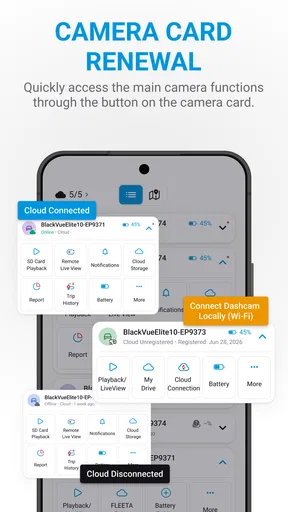
First things first, setting up the BlackVue app is a breeze. You’ll need to connect your dash cam via Wi-Fi, which might sound a bit daunting if you’re not a tech wizard, but trust me, it’s pretty straightforward. Once you’re connected, the app’s interface is clean and user-friendly, making navigation feel like a drive in the park.
After downloading the app, available on both Android and iOS, I was greeted with a simple yet intuitive interface. The dashboard is laid out in a way that even those who aren’t tech-savvy will find easy to navigate. From live view to file management, everything is just a tap away.
Making footage easier to find and share
The app’s features are where the magic really happens. One of the things I loved is the Live View feature, which lets you see what your dash cam is recording in real time. It’s like having eyes on the back of your head, only better!
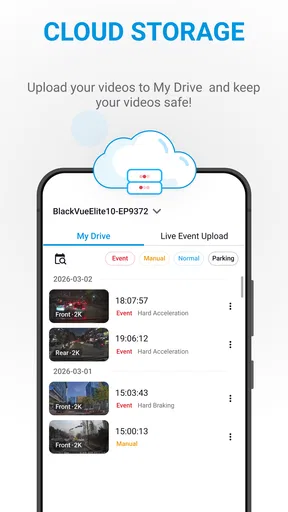
Another cool feature is the ability to download and share your videos directly from the app. Imagine capturing a breathtaking sunset or, unfortunately, an accident, and being able to send the footage to your insurance company or friends with just a few taps. It’s convenience at its best.
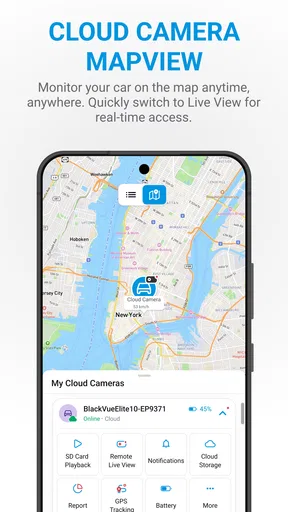
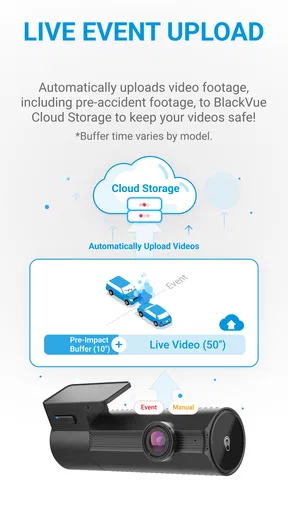
For the more tech-inclined users, the app also allows for Cloud connectivity. This means you can access your footage anytime, anywhere. Plus, with GPS tracking, you can review your driving history, which is particularly useful for fleet management or just keeping track of your trips.
One practical habit I would adopt is checking that a clip is saved and playable before clearing or overwriting anything on the camera. If an incident matters, I would download the recording promptly and make sure the copy is somewhere I can find later. Sharing from a phone is convenient, but it is still worth checking that the intended recipient can open the file and that the right segment—not just a nearby moment—was selected.
Cloud access changes the trade-off. It can be handy when the car is away from home or another household member has it, but it depends on having the right setup and a working connection. I would not treat cloud viewing as a substitute for confirming an important recording on the camera itself. The app offers a convenient route to footage; the driver still needs a basic plan for saving and sharing anything consequential.
Connection, coordination, and everyday use
Aside from its feature-packed offerings, what really stands out about the BlackVue app is its user experience. The app runs smoothly without any hiccups, and the video playback quality is excellent. Gone are the days of grainy footage; instead, you get crystal clear recordings that can be crucial in various situations.
One minor hiccup I noticed was the initial Wi-Fi connection setup. It took a couple of tries to get it right, but once connected, everything worked like a charm. So, if you face any connectivity issues, don’t fret. It’s worth the persistence!
That first connection is also where shared use can become confusing. If one driver has already connected, another may need a moment to understand which camera network to join and when to return the phone to its usual Wi-Fi connection. I would test the process while parked, not at the roadside after a stressful incident. A short practice run helps each regular driver learn the sequence without distracting anyone behind the wheel.
Compared with a basic dashcam app that only browses recordings over a local connection, BlackVue’s cloud option and GPS-related trip review give it a broader role. Compared with a navigation app, though, it is not a replacement for route guidance or traffic-aware directions. I would choose this app because I own a compatible BlackVue camera and want to manage its footage; for someone who simply wants maps, a regular navigation app is the more direct choice.
Settings and household boundaries
For those who love customization, the app provides several settings to tweak. You can adjust the camera’s sensitivity, set event alarms, and even configure parking mode settings. It’s like having a mini command center at your fingertips.
These controls are worth approaching carefully when several people drive the same car. A sensitivity change that suits one person’s routes may create a different experience for another, so I would avoid changing settings casually without telling the other regular drivers. The same goes for parking mode: it is a camera setting, not a promise that every household member will receive an alert or have a particular level of access.
The app also supports multiple languages, which is a thoughtful addition for non-English speakers. It’s little touches like these that make the BlackVue app stand out in the crowded dash cam app market.
For families, the Everyone age rating makes the app broadly suitable from an age-classification standpoint, but I would still keep camera access and account use under an adult’s supervision where appropriate. Footage can show where a vehicle has been and who was driving, so it deserves a little care. I would agree within the household on when recordings are reviewed and shared, rather than treating every trip as material for casual posting.
There is also a practical reason not to give every driver the same responsibility. A new or occasional driver may only need to know how to connect and view a clip, while the camera owner can handle deeper settings and cloud configuration. That division is a household choice, not a special family-control system in the app. It keeps routine use simple and reduces the chance that someone changes a setting without realizing it affects the shared car.
Who will get the most from it
The app makes most sense for BlackVue camera owners who expect to review trips, check a live view, save a clip to a phone, or use cloud access as part of their camera setup. It can also suit a small work team sharing a vehicle, provided the people involved agree on who manages footage and settings. The developer is pittasoft, and the current version is 4.20; the app has been available since October 19, 2015, and has passed 500 thousand installs.
I would skip it if I did not own a compatible BlackVue dashcam, or if my main need were navigation, location sharing, or a general camera roll. It is also a poor fit for anyone who wants zero setup: the Wi-Fi connection can take a little patience, and cloud-related use is not the same as simply opening a local video. The app itself is free, while in-app purchases range from $0.99 to $299.99 per item, so I would check the purchase details before committing to anything beyond the free install.
One useful way to evaluate it is to try the whole workflow on an ordinary drive: connect while parked, open Live View, find a recording afterward, and test downloading a short clip. That reveals more than browsing menus because it shows whether the connection and file handoff suit your phone and your habits. If that routine feels manageable, the app is more likely to be useful when a recording actually matters.
Final Thoughts
In conclusion, the BlackVue app is a must-have if you own a BlackVue dash cam. It’s loaded with features that enhance the overall dash cam experience, making it more than just a tool for capturing footage. Whether you’re tech-savvy or not, the app’s intuitive design ensures that you’ll be up and running in no time.
So, if you’re looking for an app that offers reliability, functionality, and ease of use, then the BlackVue app is definitely worth a download. It’s like having a personal assistant for your dash cam, and who wouldn’t want that?
My household verdict is more measured: it is a focused companion that can make a shared camera easier to use, but it works best when one person takes responsibility for setup and everyone knows how to retrieve a clip. I would recommend it to BlackVue owners who want phone-based access to recordings and are willing to practice the connection before they need it. For a household that wants live family location, turn-by-turn directions, or a hands-off system with no coordination, I would choose a different kind of app instead.
Verdict
Strengths of BlackVue
- High-quality video recording in all lighting conditions.
- User-friendly interface for easy navigation.
- Real-time GPS tracking and speed data.
- Supports cloud storage for video backup.
- Customizable event notifications and alerts.
Limitations of BlackVue
- Can consume significant battery power.
- Requires stable internet for cloud features.
- Occasional app crashes reported by users.
- Subscription needed for premium features.
- Initial setup may be confusing for beginners.
Similar Picks in This Category
View All
Uber - Request a ride
Uber Technologies, Inc.4.7


inDrive. Rides with fair fares
® SUOL INNOVATIONS LTD4.8

Yandex Go: Taxi Food Delivery
Mikromobilnost LLC Belgrade4.8

Bolt: Request a Ride
Bolt Technology4.8

Rapido: Bike-Taxi, Auto & Cabs
Rapido Bike Taxi4.8
Frequently Asked Questions
What features does the BlackVue app offer?
The BlackVue app provides a suite of features designed to enhance your dashcam experience. Users can view live footage, access recorded videos, and use the two-way voice communication feature. Additionally, the app offers cloud connectivity for remote access and notifications, ensuring you stay informed about your vehicle’s status at all times.
Is the BlackVue app compatible with all dashcam models?
The BlackVue app is specifically designed to work with BlackVue dashcam models. While it may support a wide range of BlackVue devices, it’s crucial to check compatibility with your specific model. Compatibility ensures you can fully utilize features like cloud connectivity and live streaming without issues.
How does the cloud service in the BlackVue app work?
BlackVue’s cloud service allows users to remotely access their dashcam footage from anywhere. You can receive real-time notifications, stream live video, and even back up important clips to the cloud. This service requires a stable internet connection and may involve subscription fees for extended storage or premium features.
Are there any costs associated with using the BlackVue app?
The BlackVue app itself is free to download and use. However, some features, particularly those involving cloud services, may require a subscription. These fees typically cover additional storage space and premium functionalities. It’s advisable to review the pricing structure within the app to understand any potential costs.
How user-friendly is the BlackVue app for beginners?
The BlackVue app is designed with user-friendliness in mind, featuring an intuitive interface that guides users through setup and daily use. First-time users will find helpful tutorials and support within the app. However, as with any tech product, a brief learning curve is expected as you familiarize yourself with its features.
